Chat And Timeline
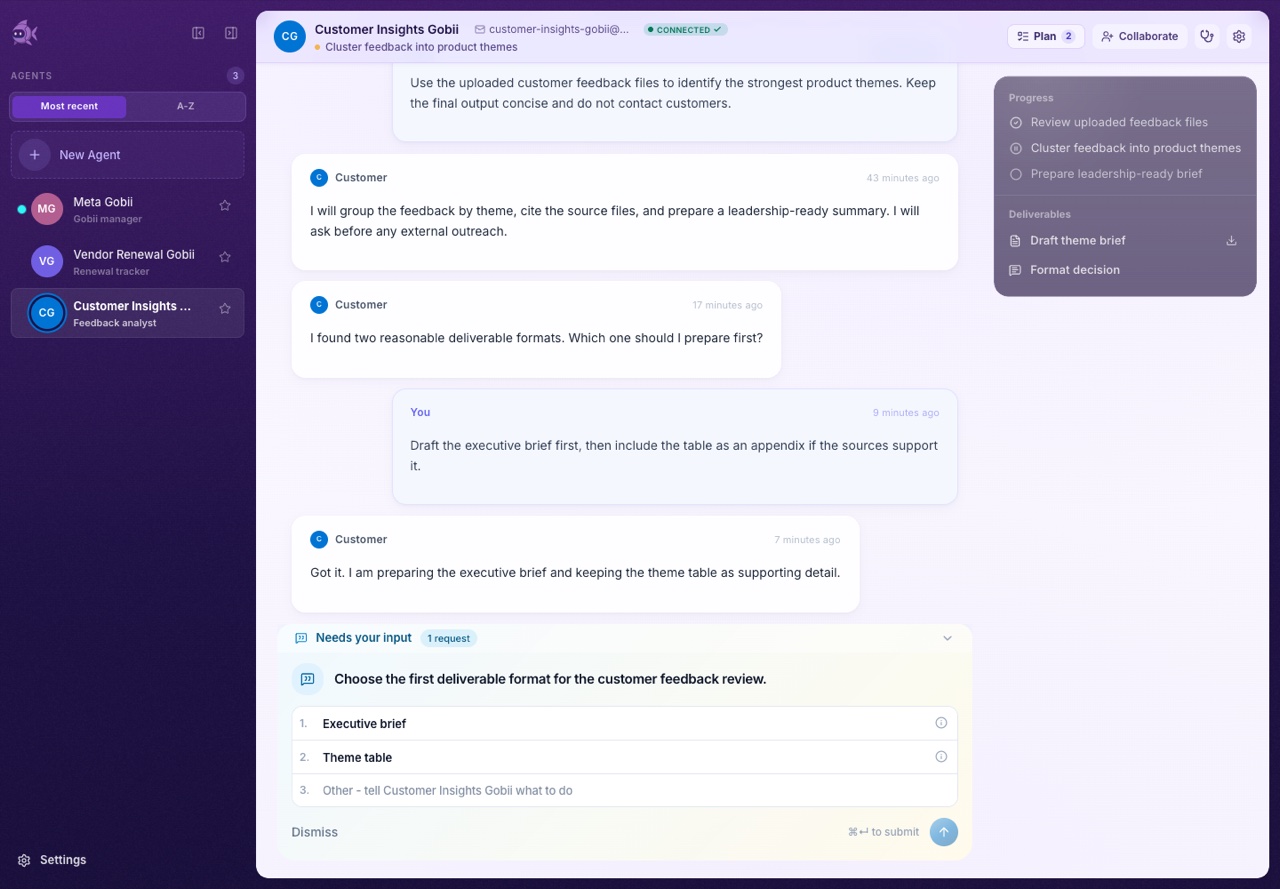
Chat is where you talk to a Gobii. The timeline is the broader work record: messages, plans, tool activity, generated files, approvals, pending requests, and completed deliverables.
Open a Gobii timeline
- Open Agents.
- Select a Gobii.
- Open Chat.
If you are in an organization, confirm the correct personal or organization context before assuming a Gobii is missing.
What appears in the timeline
- Messages from you, collaborators, approved contacts, app channels, or the Gobii.
- Plan updates when Gobii breaks a request into steps.
- Deliverables such as summaries, files, tables, briefs, or reports.
- Tool activity showing meaningful work, external actions, searches, file operations, or app usage.
- Files and attachments uploaded by people or created by Gobii.
- Pending requests for approval, credentials, contact access, human input, or another Gobii.
- Processing state when Gobii is still working.
The timeline is the best place to diagnose whether Gobii is waiting, working, blocked, or finished.
Send a useful message
Good messages include:
- The desired outcome.
- Important constraints.
- The expected output format.
- Files or sources to use.
- What should require approval.
Example:
Use the uploaded renewal spreadsheet to identify the five highest-risk vendors. Create a short table with risk, reason, owner, and recommended next step. Do not email anyone yet.
Work with files in chat
Attach files directly in the composer when they are part of the current request. Use the Gobii's filespace when files should be reused across future work.
Typical flow:
- Add one or more files in the composer.
- Include the instruction for how Gobii should use them.
- Send the message.
- Review any file references or generated outputs in the timeline.
For durable file management, use Files And Workspaces.
Respond to pending requests
When Gobii needs a human decision, the timeline may show a pending request. Common examples:
- A question with options or free text.
- A request for a credential or environment-style secret.
- A request to contact a person.
- A request to create, connect, brief, or change another Gobii.
Read the request carefully. Approve only the exact action you intend. If the request is too broad, reply with a narrower instruction.
Stop or redirect work
If a Gobii is moving in the wrong direction:
- Send a corrective message if it can safely continue.
- Use stop controls when available if the current work should halt.
- Narrow the next instruction before restarting.
- Reduce or pause daily credit usage if the Gobii is consuming more than intended.
Collaborate in chat
Collaborators can work with the same Gobii when they have access. Permissions and visible controls depend on ownership, organization context, and collaborator role.
For access management, see Collaborators And Ownership.
Practical habits
- Use one primary request per message when the work is complex.
- Put durable instructions in the charter, not only in chat.
- Use filespace paths or filenames when referring to reusable files.
- Ask Gobii to summarize its plan before external communication.
- Keep credentials out of chat. Use Secrets And Credentials.